SHOOTING REAL ESTATE: OPEN OR CLOSED DOORS?
For many real estate photographers, it’s a burning question: to open the doors or not to open the doors? Some may think it’s a futile conundrum, but whether or not you open the doors in a home can actually make all the difference in the outcome of the photos.
The Short Answer...
Yes, you should open the doors.
Of course, there are exceptions to every rule. Doors that hide clutter, personal belongings, or toilets are best kept closed, but otherwise, the simple act of opening a door can enhance the look and feel of a photo in a huge way.
Keep reading to find out why you should open those doors nice and wide at your next photo shoot.
Give a Sense of the Layout
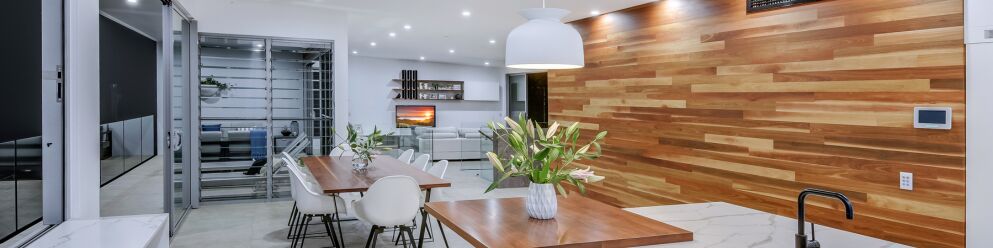
Real estate photography should always aim to showcase the home to its full potential, but it can also provide useful context for potential buyers. Shooting a property with open doors can give the viewer a sense of how the rooms connect with each other. Closing them cuts off the important stuff.

Create an Open and Spacious Feel
Take any room from feeling closed off and stagnant to spacious and enticing by simply opening the doors. Doors to outdoor entertainment areas and backyards should be opened to add depth and give the impression of that desirable indoor-outdoor living flow.

Make it Warm and Inviting
In both real life and real estate photography, an open door is essentially an invitation to look further. Opening doors works wonders to extend a warm welcome, particularly for external shots of the home where you can see the front door. With the front door wide open, viewers can envision themselves entering the home after a day at work.
Level Up Your Photos
Opening doors is a simple action that is sometimes so easily overlooked while on a busy photo shoot, but it can make a lasting impression on potential buyers. It’s one of the first steps you can take to make your images go from run-of-the-mill to unforgettable.
For more tips on taking your own listing photos, learn how to shoot a property for under $20 and the 9 items that are hurting your listing.
New to BoxBrownie.com? Sign up now and receive 4 edits free. No credit card is needed.
RELATED ARTICLES
When it comes to real estate photography, there are many things to consider to ensure that the property looks its best, and one of the most important things to keep in mind is lighting. Should you turn the lights on or keep them off when shooting a property? Read this blog to find out.
READ MORE
We get asked all the time, should I be using an expensive DSLR camera to shoot real estate? With the incredible advancements in smartphone technology, we put the new iPhone 12 to the test using the SnapSnapSnap app. Can you really shoot professional listing images for less than US$30? Let’s find out.
READ MORE
Eager to experiment with 360-degree virtual tours but are nervous about spending too much time and money getting started? In this blog, we put three of the best 360-degree budget cameras to the test to understand if it's possible to produce professional-quality virtual tours for real estate without breaking the bank.
READ MORE
Jon Sweeney transformed leasing across a 680-unit portfolio by upgrading listing photos. With sharper images and strategic virtual staging, even hard-to-rent units gained traction—cutting vacancy times and driving faster, more consistent leasing results.
READ MORE
Not every vacant room needs virtual staging. Discover how many listing photos to stage based on property size and type, from studio condos to luxury estates, so you can maximize impact without overspending.
READ MORE
A major listings study represents an even deeper dive into the US real estate industry on the part of BoxBrownie.com. Here, we talk about how we got to this point, what the study revealed, and what it all might mean.
READ MORE